Short-form video is no longer just a trend – it’s the dominant way people consume content in 2026.
From Instagram Reels to YouTube Shorts, quick and engaging videos are everywhere. And if you’re not using them, you’re missing out on one of the fastest ways to grow online.
The good news?
You don’t need a powerful PC or complex editing software anymore.
👉 With the right Android apps, you can create high-quality reels and short videos directly from your phone — quickly and efficiently.
If you want a complete overview of video creation tools, check out our main guide:
Best Intro Maker & Promo Video Apps for Android
🚀 Why Short Videos Matter More Than Ever
Let’s be real — people scroll fast.
You have just a few seconds to grab attention before someone moves on.
Short videos work because they are:
- ⚡ Quick to consume
- 🎯 Easy to understand
- 📈 Highly engaging
- 🔄 Perfect for sharing
👉 Platforms like Instagram and YouTube actively promote short content, making it easier to reach a wider audience.
🧠 What Makes a Good Reel or Short Video?
Before choosing an app, it’s important to understand what actually works.
A high-performing short video should be:
- Short and engaging (10–30 seconds)
- Have a strong hook in the first 2–3 seconds
- Visually clean and easy to follow
- Optimized for vertical viewing
👉 The goal is simple: grab attention quickly and keep viewers watching.
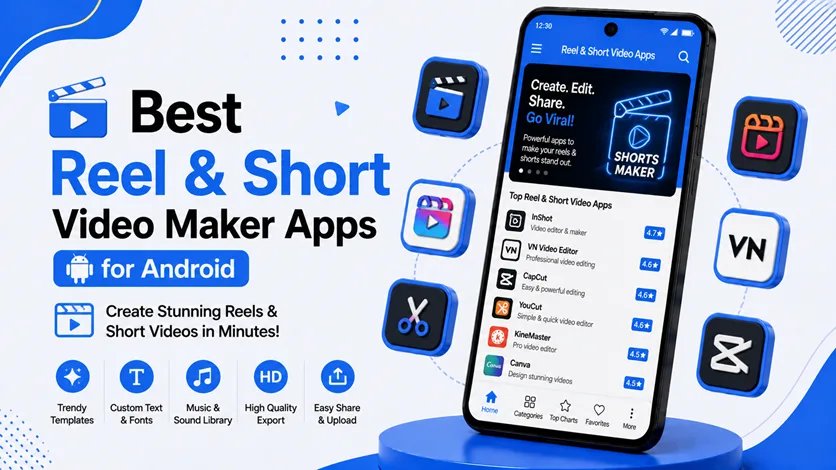
🏆 Best Reel & Short Video Maker Apps for Android
Here are the best apps to create engaging short videos on Android:
🥇 InShot
InShot is one of the most popular apps for short video editing.
⭐ Key Features:
- Trim, cut, and merge videos
- Add text, stickers, and filters
- Music and sound effects
- Easy export for social media
💡 Why it works:
It’s simple, fast, and perfect for creating reels without complexity.
👉 Best for: Beginners and quick edits
🎯 CapCut
CapCut is widely used for creating trending content.
⭐ Key Features:
- Pre-made templates
- Trending effects and transitions
- Auto captions
- AI-powered editing tools
💡 Why it works:
It helps you stay aligned with current trends.
👉 Best for: Viral and trending videos
🔥 VN Video Editor
VN offers a clean interface with powerful features.
⭐ Key Features:
- Multi-layer editing
- Speed control
- Transitions and effects
- No watermark (free version)
💡 Why it works:
It’s powerful without being complicated.
👉 Best for: Intermediate users
⚡ KineMaster
KineMaster gives full control over video editing.
⭐ Key Features:
- Multi-layer editing
- Advanced transitions
- Audio and voiceover tools
- High-resolution export
💡 Why it works:
You can create professional-level short videos.
👉 Best for: Advanced creators
🎬 Filmora (Mobile)
Filmora provides a balanced editing experience.
⭐ Key Features:
- Ready-made templates
- Effects and transitions
- Smooth editing workflow
💡 Why it works:
It’s great for polished short videos without complexity.
👉 Best for: Balanced editing
🔄 How to Choose the Right App
Choosing the right app depends on your content style and experience.
👉 Quick guide:
- Beginner: InShot, CapCut
- Intermediate: VN Editor, Filmora
- Advanced: KineMaster
👉 Start simple and upgrade as your needs grow.
📈 Productivity Improvement with Short Video Apps
Creating content regularly can be exhausting.
These apps help simplify the process.
⏱️ Faster Content Creation
Instead of complex editing:
- Use templates
- Edit quickly
- Export instantly
👉 You can create multiple videos in less time.
🧠 Less Technical Effort
You don’t need professional editing skills.
👉 Most apps are designed to be user-friendly.
🔄 Consistency in Posting
Consistency is key for growth.
👉 Faster editing = more regular uploads
⚡ More Output, Less Burnout
Creating content becomes easier and less stressful.
👉 You stay consistent without feeling overwhelmed.
💡 Real-Life Use Cases
Short video apps are used for:
- 📱 Instagram Reels
- ▶️ YouTube Shorts
- 🎵 TikTok videos
- 📢 Product promotions
- 🎯 Personal branding
👉 Anyone can use these tools — from beginners to businesses.
⚠️ Common Mistakes to Avoid
Avoid these if you want better results:
- ❌ Weak or slow opening
- ❌ Overusing effects
- ❌ Ignoring audio quality
- ❌ Making videos too long
👉 The first few seconds decide everything.
🔗 Related Articles (Internal Linking)
To build a complete video creation system, explore:
⚡ Pro Tips for Viral Short Videos
- Hook viewers in first 2 seconds
- Keep videos under 30 seconds
- Use trending audio
- Add captions (many watch without sound)
- Focus on storytelling
👉 Simple changes can massively improve performance.
❓ FAQs
What is the best app for making reels on Android?
How long should a short video be?
Can beginners create reels easily?
Do short videos help grow faster?
🎯 Final Thoughts
Short videos are one of the fastest ways to grow online today.
👉 You don’t need expensive tools or advanced skills.
With the right Android app, you can create engaging, high-quality content in minutes.
Start simple, stay consistent, and focus on delivering value — growth will follow.