Losing important WhatsApp messages can be frustrating. It could be personal chats, office details, photos, or videos. The good news is that you may still recover deleted messages if you had a backup before they were deleted.
WhatsApp does not keep your deleted chats on its servers forever. Most recovery methods work only if a backup already exists.
This guide explains all the easy ways to recover deleted WhatsApp messages in 2026.
Why WhatsApp Messages Get Deleted
Before jumping into recovery, it helps to understand why messages disappear:
- Accidentally deleting chats
- ‘Delete for Everyone’ feature
- Reinstalling WhatsApp
- Resetting your phone
- Corrupted or missing backups
- Switching to a new phone without proper transfer
No matter the reason, recovery depends on whether your data is still available in a backup.
Method 1: Restore Deleted Messages from Google Drive (Android)
If you’re using Android, WhatsApp automatically backs up chats to Google Drive.
sss
Step-by-Step Guide:
- Open WhatsApp
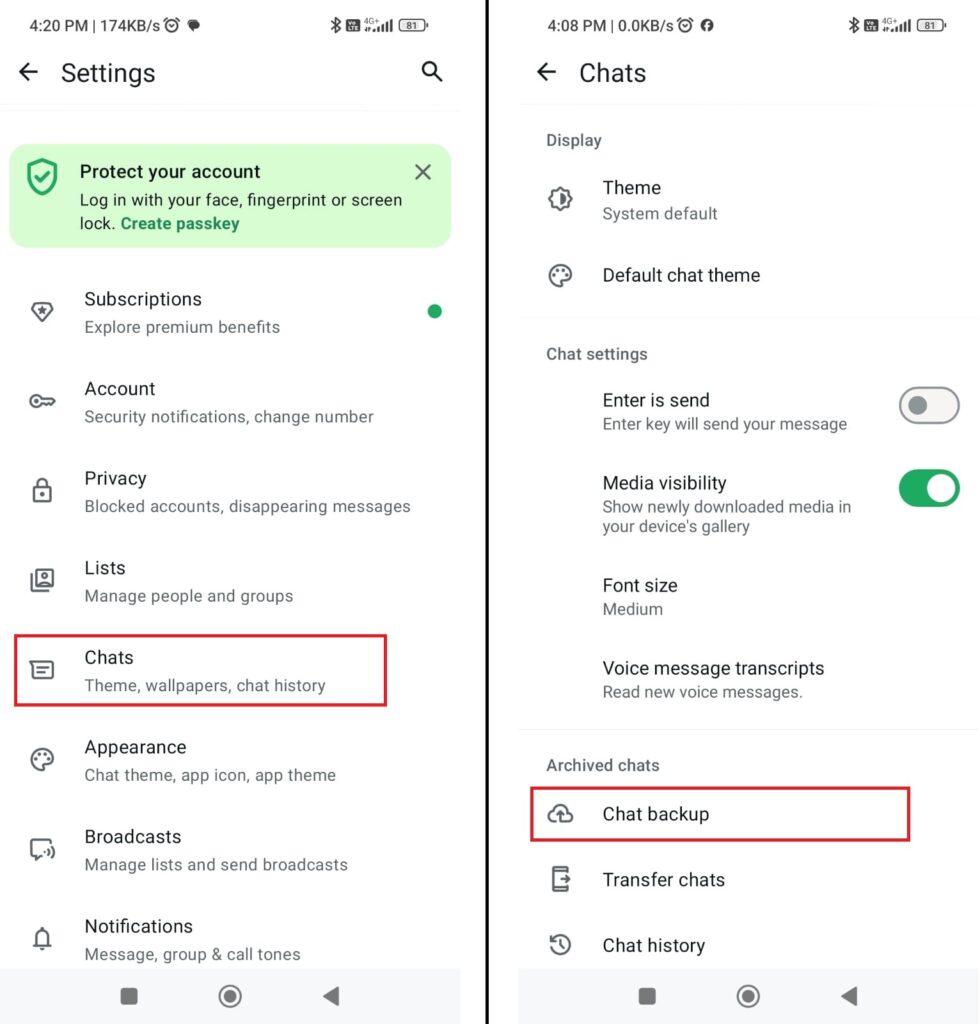
- Go to Settings → Chats → Chat Backup
- Check the last backup date
- Uninstall WhatsApp from your phone
- Reinstall it from Play Store
- Verify your phone number
- Tap Restore when prompted
When This Works:
- Backup was created before messages were deleted
- You use the same Google account
- You verify the same phone number
This is the easiest and most reliable method for Android users.
Method 2: Restore Deleted Messages from iCloud (iPhone)
iPhone users can restore chats from iCloud backup.
Steps:
- Open WhatsApp
- Go to Settings → Chats → Chat Backup
- Confirm backup exists
- Delete WhatsApp
- Reinstall it
- Verify your number
- Tap Restore Chat History
Requirements:
- Same Apple ID
- iCloud Drive enabled
- Backup created before deletion
👉 This is the official and safest method for iPhone users.
Method 3: Restore from Local Backup (Android Only)
Android phones also save local backup files in storage.
Steps:
- Open File Manager
- Navigate to:
Internal Storage > WhatsApp > Databases - Find backup files (e.g.,
msgstore-YYYY-MM-DD.db.crypt14) - Rename the file to:
msgstore.db.crypt14 - Uninstall and reinstall WhatsApp
- Tap Restore
Best For:
- Recovering older chats
- When cloud backup is missing
Method 4: Recover Deleted Messages via Notification History
Some Android phones keep a notification log, which may include deleted messages.
Steps:
- Open Settings
- Go to Notifications → Notification History
- Check old WhatsApp notifications
Limitations:
- Works only if notification history was enabled
- Shows limited text only
- Cannot recover photos or videos
Method 5: Use Third-Party Recovery Tools
Some software tools can scan your phone for deleted WhatsApp data.
- Dr.Fone
- iMobie PhoneRescue
- Tenorshare UltData
How It Works:
- Install the software on your computer
- Connect your phone
- Scan for deleted WhatsApp data
- Preview and recover messages
Important Warning:
- Recovery is not guaranteed
- Avoid unknown or fake free tools
- Some apps may risk your privacy
Method 6: Ask the Sender
Sometimes the easiest solution is the best one.
If your messages were deleted:
- The other person may still have them
- Ask them to resend the messages or screenshots
When Recovery is Not Possible
Unfortunately, recovery may fail if:
- No backup exists
- Backup was overwritten
- Messages were deleted long ago
- Phone storage was reset or cleaned
In these cases, recovery is usually impossible.
Final Thoughts (Honest Opinion)
Recovering deleted WhatsApp messages is not always guaranteed. Many websites promise full recovery, but the truth is simple:
👉 Backups are the most important thing.
If you had backups enabled, recovery is usually easy. Without backups, recovery becomes difficult and sometimes impossible.
The smartest approach is not just recovery—it’s prevention.
Recommendations (Simple & Practical)
Here are some easy habits that can protect your data:
- Enable daily backups in WhatsApp
- Use Google Drive or iCloud
- Export important chats regularly
- Keep enough cloud storage space
- Avoid random recovery apps
These steps take only a few minutes but can save you from losing valuable data.
Best Overall Strategy
The most effective method is:
👉 Cloud Backup + Immediate Restore
Why this works best:
- Official and secure
- Highest success rate
- Easy for beginners
- No data privacy risks
Ideal Strategy:
- Enable automatic backups
- Check backup date regularly
- Restore as soon as deletion happens
This remains the best and most reliable solution in 2026.
Pro Tips (Advanced but Easy)
Want extra protection? Follow these expert tips:
- Set backup frequency to daily
- Backup only on Wi-Fi and while charging
- Keep older local backups on Android
- Turn on notification history
- Avoid reinstalling WhatsApp again and again
- Use trusted apps only
Conclusion
Recovering deleted WhatsApp messages is possible, but only in certain situations. The most important thing to remember is:
👉 If you have a backup, you’re safe. If not, recovery becomes difficult.
So instead of relying on recovery tools, focus on regular backups and smart data habits.
Frequently Asked Questions
Q1. Can I recover deleted WhatsApp messages without backup?
Recovery without backup is very limited. You can try notification history or recovery tools, but success is not guaranteed.
Q2. How old messages can I recover?
You can recover messages up to the date of your last backup.
Q3. Are WhatsApp recovery tools safe?
Some trusted tools are safe, but many are unreliable. Always use trusted software only.
Q4. Does WhatsApp keep deleted messages?
No. WhatsApp does not permanently store deleted messages on its servers.