
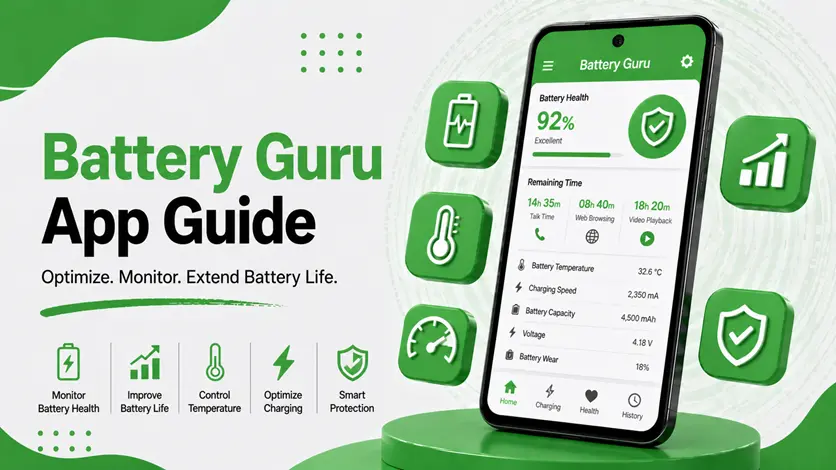
Is your phone’s battery draining quickly or behaving inconsistently?
Sometimes the problem isn’t just battery age — it’s charging habits, background usage, and hidden system activity.
👉 That’s where Battery Guru comes in.
Unlike basic battery apps, Battery Guru provides deep insights into charging cycles, battery health, temperature, and usage behavior, helping you understand what’s actually affecting your battery.
In this guide, you’ll learn how to use Battery Guru properly, how to interpret its data, and how to improve your battery performance with real insights.
⚡ What is Battery Guru & Why It’s Useful
Battery Guru is an advanced battery monitoring app that focuses on long-term battery performance and behavior tracking.
👉 It helps you:
- Monitor battery health
- Track charging cycles
- Analyze app battery usage
- Detect overheating and abnormal behavior
👉 If your phone feels slow along with battery issues, it’s worth following the guide to make your Android phone faster and boost performance, since battery condition can directly affect system performance.
🔧 How to Use Battery Guru (Step-by-Step Guide)
📲 1. Install & Initial Setup
- Download from Play Store
- Open the app
- Allow required permissions
👉 The app starts analyzing your battery behavior in the background.
🔋 2. Let It Learn Your Usage
Battery Guru needs some time to gather data.
👉 For best results:
- Use your phone normally for a few days
- Charge regularly
- Avoid uninstalling too quickly
👉 More data = better insights
📊 3. Explore Key Sections
Battery Guru provides several important sections:
- Health tab → battery condition
- Charging tab → charging speed & cycles
- Usage tab → app battery consumption
- Temperature data → overheating detection
👉 Focus on charging cycles + temperature
📊 Understanding Battery Health & Charging Cycles
🔋 What Are Charging Cycles?
A charging cycle = full 0% → 100% charge (not necessarily in one go).
👉 Example:
- 50% → 100% twice = 1 cycle
📉 Why It Matters
- More cycles = more battery wear
- Old batteries = reduced capacity
👉 Battery Guru helps track this over time.
⚡ Ideal Charging Habits
👉 Best range:
- Keep battery between 20% – 80%
👉 This reduces stress and extends lifespan.
🌡️ Temperature Monitoring (Very Important)
Battery Guru tracks temperature in real time.
👉 High temperature can:
- Damage battery
- Reduce lifespan
- Cause performance issues
👉 If your phone overheats frequently, check the guide on why your phone is overheating and how to fix it.
⚠️ Common Issues & Fixes
❌ 1. Fast Battery Drain
👉 Possible reasons:
- Background apps
- High brightness
- Poor battery health
🔧 Fix:
- Restrict background apps
- Optimize settings
👉 You can also follow the guide to improve battery life on Android for better results.
🔄 2. Charging Takes Too Long
👉 Possible reasons:
- Weak charger
- Low current
- Cable issue
👉 Use tools like Ampere to verify real-time charging speed.
🔥 3. Phone Heating While Charging
👉 Causes:
- Heavy usage during charging
- Poor ventilation
- Background activity
👉 Battery Guru helps detect this early.
🔍 Accuracy & Limitations
⚠️ Important Notes
- Data improves over time
- Not 100% hardware-accurate
- Depends on device sensors
👉 Treat it as a smart monitoring tool, not exact measurement.
🆚 Battery Guru vs AccuBattery vs Ampere
📱 Battery Guru
- Focus → charging cycles + behavior
- Best for → long-term monitoring
🔋 AccuBattery
- Focus → battery health estimation
- Best for → capacity tracking
⚡ Ampere
- Focus → real-time charging speed
- Best for → charger testing
👉 Best approach:
- Battery Guru → overall monitoring
- AccuBattery → health tracking
- Ampere → quick checks
👉 For a complete list, explore the best apps to check battery health and charging speed on Android.
👍 When You Should Use Battery Guru
Use it if:
- Battery drains fast
- Phone heats frequently
- Charging behavior seems inconsistent
- You want long-term battery insights
👉 It’s ideal for understanding battery behavior deeply.
⚡ Pro Tips (Real-World Optimization)
- Avoid heavy usage while charging
- Keep phone cool
- Use original charger
- Reduce background apps
👉 Also, keeping your system clean helps — make sure to clear cache on Android regularly for better performance.
🧠 Best Strategy for Battery Optimization
Follow this:
Track → Analyze → Improve
- Track battery data
- Analyze patterns
- Improve habits
👉 This ensures long-term efficiency.
🎯 Final Thoughts
Battery Guru gives you deeper insights into how your battery behaves — something most users ignore.
👉 When you understand charging cycles, temperature, and usage patterns, you can extend your battery life significantly.
👉 Use it consistently, combine it with good habits, and your phone will perform better for longer.

