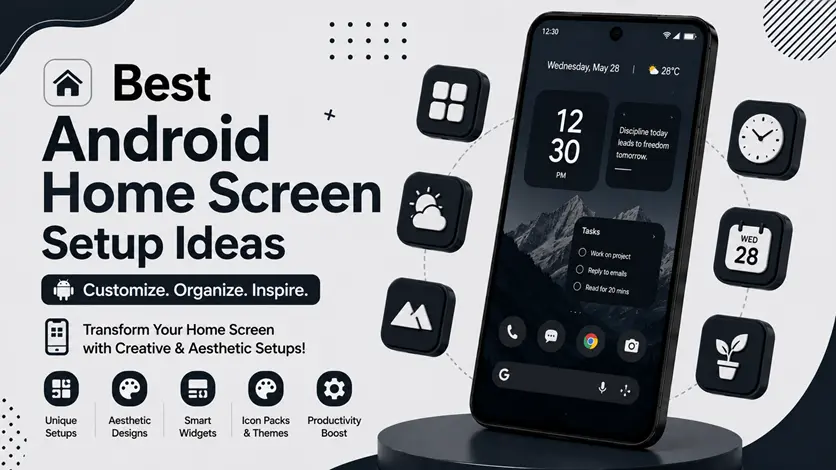
Your Android home screen is something you see dozens of times every day — so why keep it cluttered, boring, or unorganized?
A well-designed home screen doesn’t just improve appearance. It also helps you:
- Stay organized
- Reduce distractions
- Access apps faster
- Create a cleaner and more premium experience
That’s why home screen customization has become more popular than ever in 2026.
From minimal layouts to aesthetic themes and productivity-focused setups, Android gives you complete freedom to design your phone the way you want.
👉 If you want full customization tools, you can also explore the best Android personalization apps (customize your phone like a pro) to transform your entire device experience.
In this guide, you’ll discover the best Android home screen setup ideas, understand why they work, and learn how to build a setup that looks stylish while remaining practical.
🧠 Why Home Screen Setup Matters
Many people focus only on wallpapers or icons, but a good setup is about much more than looks.
A properly organized home screen can:
- Improve productivity
- Reduce visual clutter
- Make navigation easier
- Create a smoother user experience
For example:
- A minimal setup helps reduce distractions
- A productivity setup helps you access important tools faster
- A dark AMOLED setup can even help save battery on some devices
👉 In simple words:
A good home screen should look great and make your phone easier to use.
🎨 What Makes a Good Android Home Screen Setup?
Before copying random designs online, it’s important to understand what actually creates a clean setup.
✅ Key Elements of a Great Setup
📱 Launcher
Controls layout, gestures, and app drawer design.
👉 You can explore the best launcher apps for Android (complete UI transformation guide) to fully customize your home screen experience.
🎯 Icon Pack
Creates a consistent and professional visual style.
👉 Using the best icon pack apps for Android (make your home screen look professional and stylish) can instantly improve your phone’s appearance.
🧩 Widgets
Widgets add both style and functionality.
👉 You can use the best widget apps for Android (stylish home screen setup guide) to display useful information like weather, calendar, and battery status.
🌄 Wallpaper
A clean wallpaper ties everything together visually.
👉 To create a more dynamic setup, you can also explore the best free live wallpaper & collage maker apps for Android.
🔥 Best Android Home Screen Setup Ideas
🥇 1. Minimal Home Screen Setup
Minimal setups focus on:
- Fewer apps
- Clean layout
- Neutral colors
- Distraction-free design
✅ Why It Works
A minimal setup reduces visual clutter and helps your phone feel cleaner and faster.
🎯 Best For
- Productivity users
- Students
- Users who prefer simplicity
💡 Pro Tip
Use:
- White or monochrome icons
- One widget only
- Dark or plain wallpaper
🎨 2. Aesthetic Setup
Aesthetic setups focus more on visual appeal and creativity.
✅ Features
- Matching color themes
- Custom widgets
- Soft wallpapers
- Styled icon packs
🎯 Best For
Users who enjoy creating visually attractive home screens.
💡 Pro Tip
Stick to one color palette for a cleaner look.
🌑 3. Dark AMOLED Setup
Dark setups use black backgrounds and dark UI elements.
✅ Why It’s Popular
- Looks premium
- Easier on eyes at night
- Can help battery life on AMOLED screens
🎯 Best For
- Gaming phones
- OLED/AMOLED devices
- Users who prefer modern UI style
⚡ 4. Productivity-Focused Setup
This setup prioritizes speed and efficiency.
✅ Features
- Calendar widgets
- To-do list widgets
- Quick access apps
- Organized folders
🎯 Best For
- Professionals
- Students
- Busy users
👉 To improve your workflow further, you can explore the best Android workflow apps (organize tasks & boost productivity).
🎮 5. Gaming Home Screen Setup
Gaming setups are designed for:
- Quick game access
- Cleaner performance
- Reduced distractions
✅ Features
- Game folders
- Gaming widgets
- Dark themes
- Simple layout
👉 Gamers can also check the best game launcher apps for Android (boost performance & FPS) for smoother gameplay.
⚠️ Common Home Screen Mistakes
Avoid these mistakes:
- Adding too many widgets
- Overcrowding the screen
- Mixing multiple icon styles
- Using overly bright wallpapers
👉 Simplicity usually looks better.
👍 My Recommendations
If you’re just starting:
🥇 Best Beginner Setup
Minimal setup
🎨 Best Stylish Setup
Aesthetic setup
⚡ Best Practical Setup
Productivity-focused setup
👉 Start simple and improve gradually.
⚡ Pro Tips for Better Setup Design
- Use consistent colors
- Keep app count low
- Match icons with wallpaper
- Avoid cluttered widgets
👉 Small details make a huge difference.
🧠 Best Setup Strategy
Follow this system:
Choose Style → Customize → Refine
- Choose your setup style
- Customize launcher/icons/widgets
- Refine based on daily use
👉 The best setup is one that looks good and feels comfortable to use.
🎯 Final Thoughts
Android customization is not just about making your phone look different — it’s about creating a better overall experience.
👉 Whether you prefer a clean minimal layout or a stylish aesthetic design, the right setup can completely transform how your phone feels.
👉 Start with simple changes, experiment with different styles, and gradually build a setup that fits your personality and daily needs.