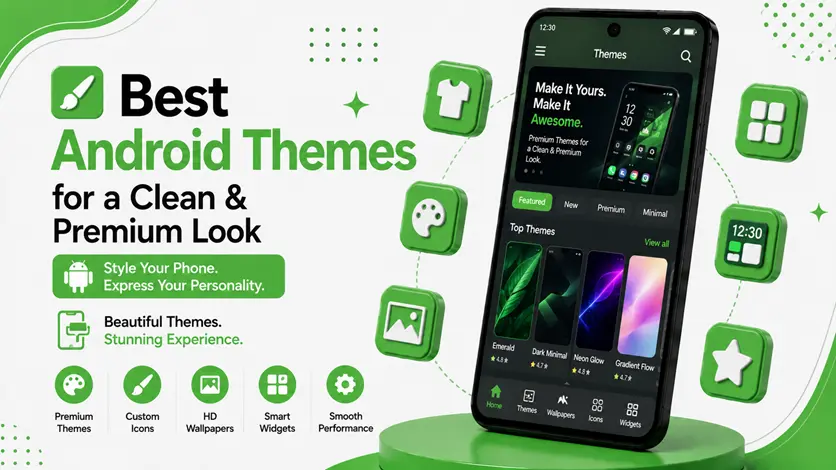
Your Android phone may have powerful hardware, but if the interface looks cluttered or outdated, the overall experience can still feel ordinary.
That’s where Android themes make a huge difference.
A good theme can completely transform your device by changing:
- Colors
- Icons
- Wallpapers
- Widgets
- Overall UI style
But themes are not just about appearance.
A clean and well-designed setup can also:
- Improve usability
- Reduce visual clutter
- Make your phone feel smoother and more premium
👉 If you want complete setup inspiration, you can also explore the best Android home screen setup ideas (aesthetic & minimal designs) to create a stylish and organized layout.
In this guide, you’ll discover the best Android themes and setup styles that can give your device a clean, modern, and premium look in 2026.
🧠 Why Android Themes Matter
Most people use the default setup on their phones for years without realizing how much customization can improve the experience.
A good Android theme helps:
- Create visual consistency
- Improve home screen organization
- Make the interface easier to use
- Reflect your personal style
For example:
- Dark themes look modern and reduce eye strain
- Minimal themes reduce distractions
- Material-style themes create a clean and balanced interface
👉 In simple words:
A theme changes how your phone feels every time you use it.
🎨 What Makes a Theme Look Premium?
A premium-looking Android theme is not just about flashy colors or effects.
The best setups usually focus on:
- Consistent icon style
- Balanced colors
- Clean widget placement
- Simple layouts
- Matching wallpaper and UI elements
👉 The goal is to create a setup that feels modern, organized, and comfortable to use daily.
🔥 Best Android Theme Styles for a Clean & Premium Look
🥇 1. Minimal Theme
Minimal themes focus on simplicity and clean design.
✅ Features
- Simple icons
- Neutral colors
- Less clutter
- Smooth layout
🎯 Why It Works
Minimal setups reduce distractions and make your home screen look more organized.
💡 Best For
- Productivity users
- Students
- Users who prefer simplicity
👉 Pair this with the best minimal apps for Android (lightweight & fast apps) for a cleaner overall experience.
🌑 2. Dark AMOLED Theme
Dark AMOLED themes are one of the most popular styles in 2026.
✅ Features
- Black backgrounds
- Dark icons
- Premium visual feel
- Reduced eye strain at night
🎯 Why It Works
Dark themes create a modern look and can help improve battery efficiency on AMOLED displays.
💡 Best For
- Gaming phones
- OLED/AMOLED devices
- Users who prefer modern UI styles
🎨 3. Material You Theme (Modern Android Style)
Inspired by modern Android design, Material You themes automatically adapt colors based on your wallpaper.
✅ Features
- Dynamic colors
- Smooth UI design
- Balanced interface
🎯 Why It Works
Everything feels visually connected and modern.
💡 Best For
Users who want a clean stock Android experience with personalization.
⚡ 4. Productivity Theme
This setup style focuses more on usability than decoration.
✅ Features
- Calendar widgets
- Organized folders
- Minimal distractions
- Clean navigation
🎯 Why It Works
Helps improve workflow and makes daily tasks easier to manage.
👉 To improve efficiency further, you can explore the best Android workflow apps (organize tasks & boost productivity).
🌄 5. Aesthetic Theme
Aesthetic themes focus on creativity and visual appeal.
✅ Features
- Matching color palettes
- Styled widgets
- Custom icons
- Artistic wallpapers
🎯 Why It Works
Creates a unique and visually pleasing setup.
💡 Best For
Users who enjoy designing personalized home screens.
🧩 Apps That Help Create Better Themes
A great theme usually combines multiple customization tools.
🚀 Launcher Apps
Launchers control:
- Layout
- Gestures
- App drawer design
👉 You can explore the best launcher apps for Android (complete UI transformation guide) to fully customize your interface.
🎯 Icon Pack Apps
Icons are one of the biggest visual elements of any theme.
👉 Using the best icon pack apps for Android (make your home screen look professional and stylish) helps create a more polished and consistent design.
🧩 Widget Apps
Widgets improve both style and functionality.
👉 You can use the best widget apps for Android (stylish home screen setup guide) to add weather, calendar, clock, and battery widgets beautifully.
🌄 Wallpapers & Live Wallpapers
Wallpapers complete the overall look of your setup.
👉 To improve visuals further, you can check the best free live wallpaper & collage maker apps for Android.
⚠️ Common Theme Mistakes
Avoid these mistakes:
- Using too many colors
- Mixing unrelated icon styles
- Overloading widgets
- Choosing distracting wallpapers
👉 A cleaner setup almost always looks more premium.
👍 My Recommendations
🥇 Best Overall Style
Minimal + Material You combination
🌑 Best Premium Look
Dark AMOLED theme
⚡ Best Practical Setup
Productivity-focused theme
👉 Simplicity usually creates the best experience.
⚡ Pro Tips for Better Theme Design
- Use consistent colors
- Match icons with wallpaper
- Avoid crowded layouts
- Keep widgets minimal
👉 Small details create a huge visual difference.
🧠 Best Theme Strategy
Follow this:
Choose Style → Customize → Refine
- Choose a visual style
- Customize launcher/icons/widgets
- Refine based on comfort and usability
👉 The best Android theme is one that looks clean while staying practical for daily use.
🎯 Final Thoughts
Android themes are more than visual customization — they completely change how your device feels every day.
👉 Whether you prefer minimal setups, dark AMOLED designs, or aesthetic layouts, the right theme can make your phone feel cleaner, faster, and more premium.
👉 Start simple, experiment with different styles, and create a setup that matches both your personality and daily workflow.